In 2008, just 12% of organizations utilized cloud-based CRM - This figure now expanded to above 90%.
Are you looking out for the perfect cloud-based CRM for your business?
Vtiger Cloud (On-Demand) is a leading player in the cloud CRM domain that will give you access to real-time customer information anytime, anywhere. Affordable, easy-to-use, secured, maintenance-free, and flexible, it is ideal for customer-centric businesses.
Try Vtiger CloudSimply put, cloud CRM (or CRM cloud) is a customer relationship management system that is completely hosted in the cloud. Customer data is stored securely and is accessible through the Internet.
Most companies have migrated CRM technology to the cloud as it is flexible and cost-effective. Users can easily access CRM applications through web-based tools or browsers. Team members of an organization can log in to the CRM software from anywhere in the world, from any Internet-enabled device.
A cloud CRM is a customer relationship management platform hosted on secure online servers and delivered via SaaS (Software as a Service). Instead of running on local infrastructure, the system is accessed over the Internet, ensuring real-time updates, data scalability, and lower maintenance overheads. This model benefits employees, leadership teams, and IT by unifying customer data and make it accessible, and actionable across the business.
Employees interact with cloud CRM through a web-based interface or mobile application. This eliminates dependency on location or device. For example, sales executives can update deal progress while on client visits, service agents can retrieve past case histories during live calls, and marketing teams can pull campaign performance metrics without waiting for IT-generated reports.
The system centralizes contact databases, activity timelines, and communication history, ensuring that employees always work with the most recent version of customer data. Features such as role-based access, automated task reminders, and mobile notifications further streamline day-to-day activities, making every interaction more informed and efficient.
At the organizational level, a cloud CRM creates a 360-degree customer view by integrating with ERP systems, email marketing tools, ecommerce platforms, and customer support applications. This integration ensures that data silos are broken down and departments operate on a single source of truth.
Executives gain access to live dashboards showing revenue pipelines, churn rates, service response times, and campaign ROI. Because the system continuously syncs across touchpoints, business leaders can rely on accurate insights to forecast demand, and measure customer lifetime value (CLV). This visibility helps create better customer retention strategies, which in turn make revenue more steady and predictable.
From the perspective of IT teams, cloud CRM reduces the burden of infrastructure management. The responsibility of building, securing, and maintaining the system lies with the external provider. IT staff do not need to handle logistics, updates, or security management, nor do they need to manually update each computer whenever changes are required. The cloud CRM also integrates with existing business tools and external applications, consolidating all data into one platform. This eliminates data silos and ensures that teams across the organization always have access to the latest customer information.
A cloud CRM maintains a unified customer information system that stores all customer and prospect details , including contact information, interaction history, preferences, and demographic data. Lead scoring and tracking help sales teams identify high-potential prospects, prioritize follow-ups, and monitor progress through the sales pipeline. All communications, notes, and activities are logged, ensuring accurate records are available for every interaction.
The Customer 360 feature provides a comprehensive profile for each customer, consolidating orders, calls, messages, complaints, and other interactions in one place. Teams no longer need to search across multiple systems to find information. This integrated view ensures that sales, service, and marketing teams can access the latest and complete data to make well-grounded decisions.
Cloud CRM platforms provide visual interpretation to track deals at every stage, from initial contact to closure. Sales teams can monitor opportunities, set follow-up reminders , forecast revenue, and evaluate win-loss ratios. Managers gain insights into team performance, pipeline bottlenecks, and revenue trends to make informed decisions.
Integrated marketing automation tools enable teams to create and manage email campaigns, lead-nurturing sequences, and customer segmentation. Teams can monitor campaign performance, analyze engagement, and measure return on investment. Automation reduces repetitive tasks and ensures consistent and timely communication with prospects and customers.
CRM platforms include ticketing systems, case management, and knowledge bases to help service teams resolve issues efficiently. Service level agreements and escalation rules ensure timely responses to inquiries. Tracking of cases allows teams to monitor resolution times, identify recurring problems, and improve service processes.
Cloud CRM systems can automatically perform tasks based on set rules. For example, they can assign tasks, send follow-up emails, or update records without manual work. This ensures processes are consistent across teams, helps everyone stay on track, and reduces the chance of errors. Workflow automation supports key business operations like routing leads, approving requests, or escalating issues quickly.
Modern cloud CRMs include AI tools that help teams make better decisions. AI can highlight the most promising leads, suggest the next steps for customer interactions, and forecast sales outcomes. It can also automate routine tasks, such as drafting emails or segmenting customers based on behavior. By using AI, teams can focus on high-priority tasks and improve sales, service, and marketing results.
Cloud CRM systems can be customized to match the way your business works. You can change fields, layouts, dashboards, and workflows to fit your processes and terminology. No-code tools let users create workflows, dashboards, and AI features without programming knowledge. This makes sure the system works for your specific needs and can grow with your business.
Cloud CRMs can connect with other business software such as accounting tools, marketing platforms, e-commerce systems, and productivity apps. These integrations allow data to flow smoothly between systems, keeping information up to date across departments. So when a business connects all its necessary tools in one platform, teams can work with the same information, reduce mistakes, and save time.
Cloud CRM includes built-in collaboration tools that let teams communicate internally and with customers. Users can send emails, make calls, and share updates directly from the system. Integration with PBX systems allows calls to be logged and made within the platform, while email integration syncs contacts, leads, and opportunities. Notifications, task assignments, and enterprise social network features help teams stay coordinated and informed.
Cloud CRM provides real-time dashboards and reporting tools that track sales performance, marketing effectiveness, customer behavior, and team productivity. Customizable reports allow managers to monitor trends, evaluate KPIs, and make data-driven decisions. Advanced analytics help identify areas for improvement, optimize processes, and support revenue growth.
Cloud CRM mobile apps provide access to all critical data from any location. Users can view customer records, update information, track activities, and respond to requests in both online and offline modes. Mobile access ensures field teams, remote employees, and managers can maintain workflow continuity and keep customer data current at all times.
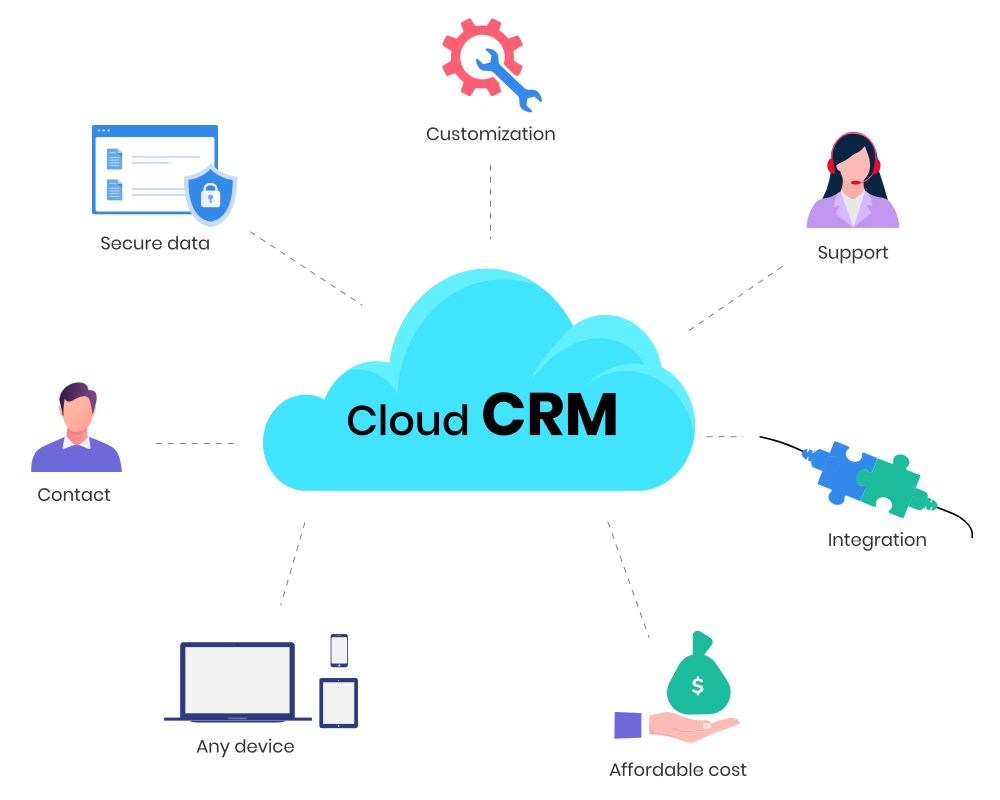
Cloud-based CRM software enables organizations to provide customers an exceptional experience. They offer integrated functionality and features that allow businesses to compete effectively and retain clients. Here are some significant benefits of cloud CRM systems:
Cloud CRM solutions are incredibly user-friendly and navigable. They have simple drag-and-drop interfaces, interactive dashboards, and intuitive applications. This makes it easy for new users to embrace technology and use all the features to their advantage.
Cloud-based CRM applications are accessible from anywhere - this increases mobility and keeps teams connected remotely. Since most CRM software is highly mobile-friendly, sales teams can access contact information on-the-move!
With cloud CRM software, organizations do not need to worry about complicated installation processes and technical glitches. All that is required is a stable internet connection - there is no requirement to pay for external servers, maintenance, or hardware components.
Security is a crucial concern for cloud-based CRM service providers. Automated back-up policies and data recovery plans ensure that there is no chance of any data loss or theft. Password protection, data encryption, and two-factor authentication further ensure data security in cloud CRM systems.
There is no concept of one-size-fits-all in CRM technology. Organizations can customize cloud CRM software to meet their business requirements. Most service providers allow companies to purchase additional modules, features, and business modules as they grow, making it a flexible solution.
CRM software can easily integrate with existing applications that organizations already use for routine workflow. This helps in the smooth exchange of data, task continuity, and enhances visibility across the entire sales pipeline.
A cloud CRM solution is a long term investment that reaps tangible benefits. It saves time by automating repetitive tasks, and this leaves team members free to focus on core sales activities, ultimately generating higher revenue.
Cloud-based CRM solutions are scalable. Hence they can accommodate the needs of your growing business. Most service vendors allow organizations to purchase additional modules so that you only pay for required features and functionality.
Cloud CRM ensures that customers can get in touch with support agents at any time of their convenience. It enhances accessibility broadly, which ultimately leads to better customer service and higher satisfaction.
Cloud CRMs are affordable as service vendors provide various pricing packages. It is a one-time investment that leads to long-term results and can be afforded even by startups and small businesses.
Vtiger cloud or Vtiger on-demand CRM software can give your business a competitive advantage. Complete access to customer data helps in better decision-making and team collaboration. Here are the top reasons to choose Vtiger cloud solutions for your organization:
Highly secure and prevents any data loss or intrusion - GDPR compliant and ISO 27001 certified.
Uninterrupted access to contact data - teams can work around the clock, from any geographical location as long as they have an internet connection.
Completely scalable as organizations can increase capacity according to financial budget, goals, and size.
Hassle-free installation and no major maintenance issues.
Flexible and customizable to business requirements.
Free and responsive support team to resolve all technical issues.
Easy integration with other apps.
Comprehensive services at an affordable cost.
Cloud CRM solutions fundamentally change how businesses manage customer data and operational workflows. With information stored off-site and accessed over the internet, teams can work from anywhere, but this also means businesses need to think carefully about how it affects their workflows. Security, compliance, system reliability, integration with other tools, and business continuity all become important. Understanding these challenges helps organizations keep operations running smoothly and make the most of their cloud CRM.
Storing sensitive customer and business information in the cloud requires trust in the provider’s security measures. Without proper protection, your data could be exposed to unauthorized access or breaches. Security issues can damage customer relationships. Customers will stop engaging with a brand after a single security breach. Which is why you need to ensure your provider has strong network security, access controls, and encryption to keep data safe while still allowing authorized staff easy access.
CRM downtime can directly impact business operations. Sales teams may be unable to access leads, marketing campaigns may stall, and customer service responses can be delayed. Checking SLAs helps businesses understand uptime guarantees, planned maintenance windows, and support response times . Downtime planning should include backup access procedures, failover options, and alternative workflows to minimize operational disruptions.
Data stored in a cloud CRM is often tied to the vendor’s architecture. Exporting or migrating this data can be difficult, especially for large datasets with historical interactions, attachments, and campaign histories. Businesses should assess vendor support for standard data formats, APIs, and integrations to prevent lock-in. Planning for portability ensures future upgrades, mergers, or tool replacements won’t disrupt operations.
Unexpected events like system failures, cyberattacks, or natural disasters can disrupt access to CRM data. Cloud CRMs should offer automated backups, redundancy across data centers, and tested disaster recovery procedures. Businesses should define internal workflows for emergency access, alternate communication channels, and data restoration to maintain sales, marketing, and service continuity.
Subscription fees, additional storage, premium modules, user add-ons, and integration costs can increase total ownership costs. Businesses need to plan for licensing, training, and potential scalability expenses. Understanding the full financial impact enables teams to prioritize CRM features, and control budget.
‘Integrating capability’ is what makes a cloud CRM truly useful in day-to-day business. Instead of overwhelming your team with hundreds of apps, it’s better to focus on the types of integrations that directly improve processes, save time, and keep your data consistent. Here’s what to consider:
Lead generation integrations can automatically capture leads from your website, landing pages, or other channels and feed them directly into your CRM. They can track visitor behavior, such as which pages are viewed, forms submitted, or downloads accessed, and update contact records accordingly. Alerts can notify sales reps the moment a high-potential lead engages, so follow-ups happen faster.
Bots and messaging integrations can take repetitive tasks off your team’s plate. For instance, a bot can notify your team of deal updates, customer inquiries, or task completions directly within chat apps or messaging platforms your team already uses. They can also gather initial customer questions, route them to the right department, and log interactions in the CRM automatically.
Email automation integrations can turn CRM data into targeted campaigns. Leads can be segmented based on behavior, engagement history, or profile attributes. Automated sequences can send follow-ups, reminders, or nurture emails depending on how leads respond. All responses and engagement data can feed back into the CRM, ensuring contact records reflect real-time activity. These integrations can run campaigns without constant manual input, while keeping your team informed about which leads need personal attention.
Analytics integrations can help teams see what’s happening in the pipeline and identify weak points. They can monitor deal velocity, track how quickly leads are responded to, and show which activities are producing results. Real-time dashboards can update automatically, displaying both individual and team performance. Some integrations can also highlight trends, like which types of products are selling faster or which steps in the workflow have indicating slow progress.
A cloud-based CRM is a system that stores and manages customer data on remote third-party servers, accessible through the internet via a browser or mobile app. The provider handles software updates, maintenance, and data security. Cloud CRMs allow teams to access information from anywhere, scale easily as the business grows, reduce IT workload, and benefit from automatic updates without requiring local installations.
The four main CRM types focus on different aspects of customer management. Operational CRM automates sales, marketing, and service tasks. Analytical CRM collects and analyzes customer data to reveal behavior and trends. Collaborative CRM enables teams across departments to share information and improve coordination. Strategic CRM connects customer insights to long-term business planning, helping organizations build relationships that support growth and retention.
A CRM organizes customer information so teams can work more efficiently. Sales teams can track leads, deals, and follow-ups. Marketing can plan and monitor campaigns while targeting the right audience. Support teams can record issues and resolutions for each customer. By keeping everything in one place, a CRM ensures everyone sees the same information, reduces errors, and helps move prospects through the sales process smoothly.
Cloud CRM runs on the internet and can be accessed from any device. It has low upfront costs, is easy to expand, and the provider handles updates. On-premise CRM is installed on company servers, giving full control over data and custom settings, but requires a higher initial investment and in-house IT support. Cloud is faster to get started and more flexible, while on-premise suits teams that need direct control.
The main advantage of a cloud CRM is that teams can access customer information anytime, anywhere without managing software locally. It reduces IT workload, allows businesses to easily expand users or features, and keeps data backed up and secure. Cloud CRMs also help teams track leads, deals, and customer interactions in real time, making daily operations smoother and easier to manage.
Customer data in cloud CRMs is protected with strong encryption both in transit and at rest. Leading CRMs comply with regulations such as GDPR and ISO standards, conduct regular security audits, and use multi-factor authentication (MFA) and access controls. Continuous monitoring, automated backups, and disaster recovery plans further reduce risk, ensuring data remains secure and can be restored quickly in case of incidents.
Access is controlled using role-based permissions, so only authorized team members can view or edit sensitive information. Permissions can be customized to enforce the principle of least privilege. Most cloud CRMs also log user activity and generate alerts for suspicious access, giving administrators full visibility and control over who sees what and helping prevent unauthorized use of data.
Cloud CRMs run automated, frequent backups stored in multiple, geographically separated locations. Data is encrypted and tested regularly to ensure integrity. In case of system failures or disruptions, disaster recovery procedures allow fast restoration of data and continuity of operations. These measures ensure businesses can recover quickly without losing critical customer information or interrupting workflow.
Cloud CRM implementation is usually fast since no on-premises hardware is needed. Small teams can start in hours, while larger migrations may take days depending on data volume and customizations. Automatic software updates reduce downtime and let new features roll out smoothly. Most businesses can begin using the system quickly and scale usage as their processes evolve.
Vendors provide onboarding programs, tutorials, webinars, and documentation to help teams get started. Support is available through chat, phone, and email, and enterprise plans often include dedicated customer success managers. Training ensures users understand the system, can set up workflows, and become productive quickly , while ongoing support addresses technical issues or questions as the team grows.
Adoption improves when the CRM is user-friendly, with intuitive dashboards, automation, and mobile access. In-app guidance, tutorials, and training programs help users get started quickly. Role-based customization ensures each team member sees only the features relevant to their work, reducing confusion and increasing productivity, so the CRM becomes a central part of daily operations instead of an extra activity.
Most cloud CRMs allow guided or automated migration from spreadsheets, legacy systems, or other CRMs. Tools for mapping fields and verifying data help preserve integrity during the process. Vendors usually provide assistance to make the transition smoother, ensuring historical customer data, notes, and interactions are transferred accurately without disrupting ongoing business activities.
Cloud CRMs support integrations with email, ERP, accounting, marketing, and other business applications. APIs, native connectors, and integration marketplaces allow workflows and data to flow between systems. Custom connectors let teams link specialized tools or build automation across multiple apps, ensuring the CRM works alongside existing software rather than replacing it entirely.
Most cloud CRMs allow you to adjust fields, workflows, dashboards, and automation to fit your business processes. Low-code tools, configurable reporting, and API access let teams create custom features, automate repetitive tasks, and generate insights specific to their needs, making the CRM adaptable as the business grows and processes change.
Mobile apps provide access to customer data, tasks, and updates from anywhere. Teams can view or edit records, manage leads, and collaborate in real time. Offline access, push notifications, and mobile-specific tools like GPS tracking or scanning features make it possible to work effectively even when away from the office, keeping workflows uninterrupted and data current.